Type B2: Illumination-Pillar Mounting
This mounting adapter is designed to be widely compatible with microscopes of various makes and models. With the adaptor installed on the illumination pilllar of the microscope, various models of manipulator can be set up

NU-1: Applicable illumination pillar
Please confirm that the illumination pillar of the microscope meets the following conditions:
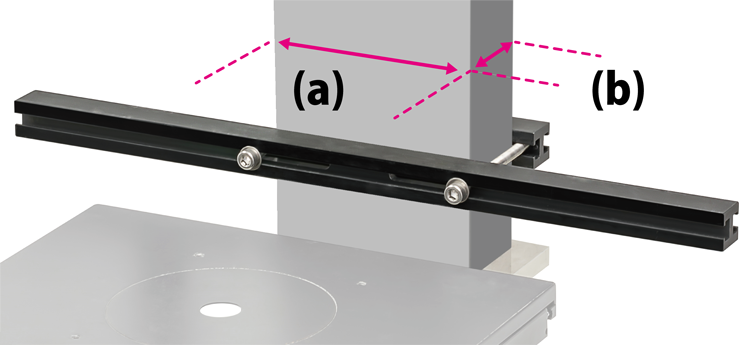
* Illumination pillar has to be:
- (a) Width: 34 mm to 110 mm
- (b) Depth: 20 mm to 50 mm
- Perpendicular to the stage
- Rectangular with the front and back parallel
- No cables or bumps where the adapter is mounted
Set-up example
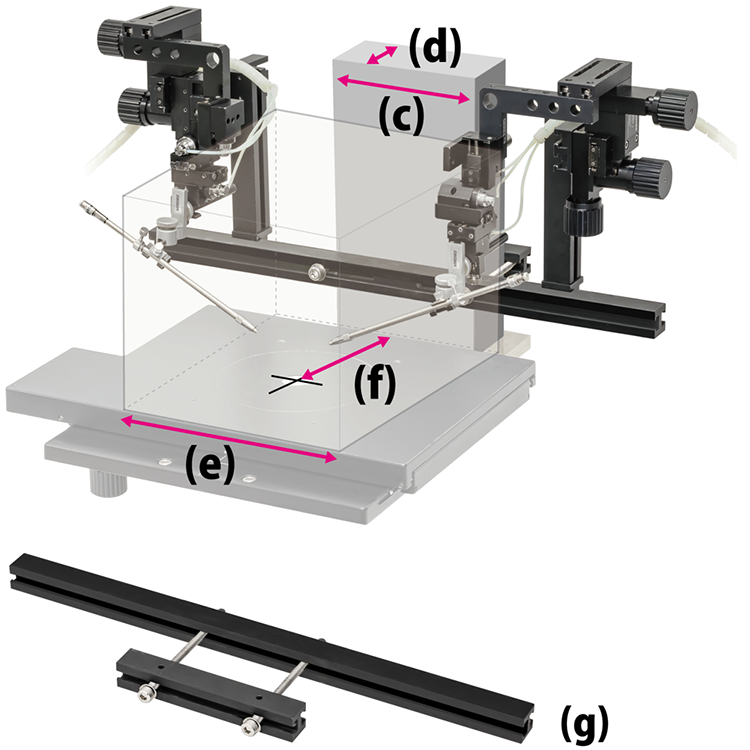
The above photo shows a set-up example of illumination pillar 110 mm wide (c) and 50 mm deep (d) with NU-1, NR2, MMN-1, and MMO-203 installed
When manipulators are mounted on both the left and right sides of the NU-1, the distance between those manipulators can be 200 mm approximately (e). This avoids interference with devices such as condensers of microscope
The holder is set so as to point to the center of the field of view (optical axis). The installation shown is optimum under the condition that the optical axis is located around 160 mm from the front of the illumination pillar (f)
If the distance to the optical axis is longer than 160 mm, it can be adjusted forward using the adjustment mechanism on the manipulator. If the distance to the optical axis is shorter, it can be adapted by changing the orientation of the mounting adapter (g)
Note: Please adjust the manipulator's position to an optimum position on the adaptor and also use adjusting mechanisms in the direction of forward / backward, left / right, and up / down


